AI Bill Summaries
YesBill can generate a plain-English AI summary for each bill, explaining the charges in a human-readable way.
What's in a Summary?
A typical AI bill summary includes:
- Total amount and breakdown
- Number of days delivered/visited
- Notable patterns (e.g. "3 days were skipped mid-month")
- Comparison to previous months (if available)
- Any anomalies or observations
Generating a Summary
- Go to Bills
- Click on a bill to open it
- Click Generate AI Summary
- Wait 3–5 seconds for the summary to appear
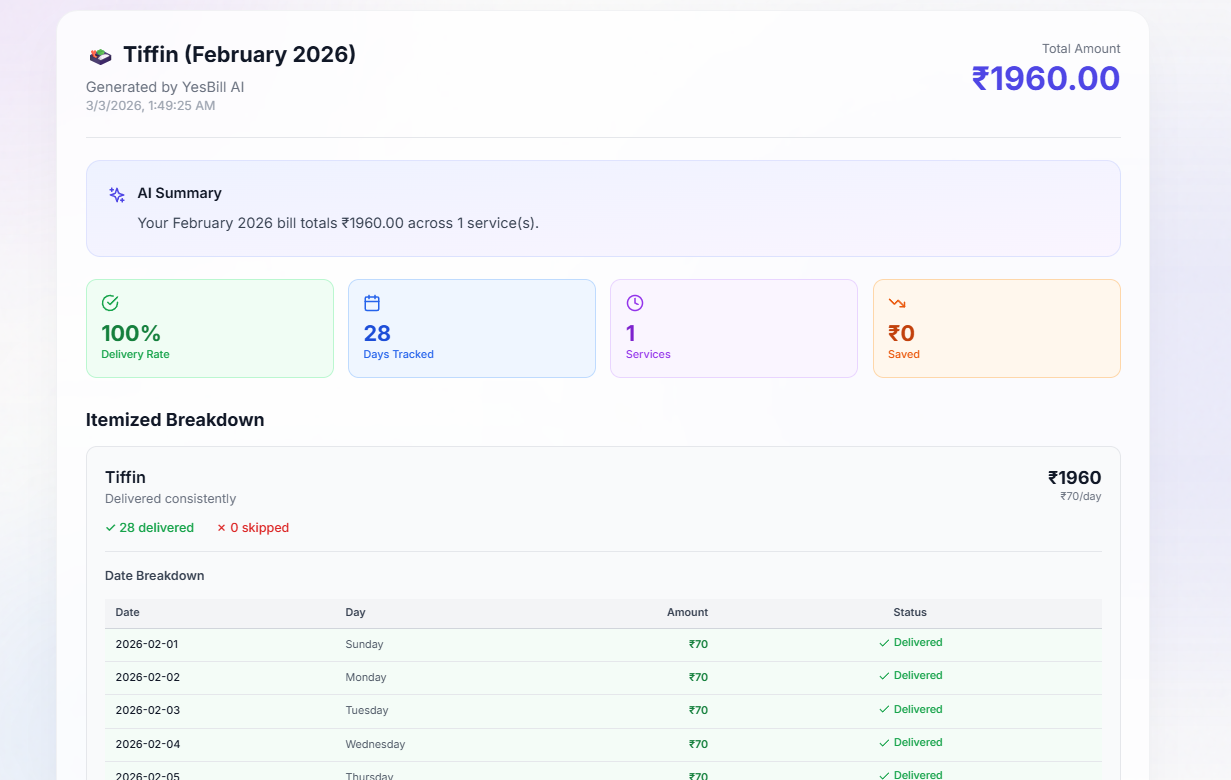
The summary appears as a card inside the bill, written in plain English. It covers the total charged, notable patterns (e.g. missed days), and a comparison to the previous month where data is available.
Example Summary
Morning Milk — January 2026
Your milk was delivered on 27 out of 31 days in January, totalling ₹1,512. The 4 missed days were on 2nd, 14th, 15th, and 28th January. This is slightly lower than your December delivery count of 29 days. Total charge: ₹56/day × 27 days = ₹1,512.
Regenerating a Summary
AI summaries are stored with the bill. To refresh:
- Open the bill
- Click Regenerate Summary
- A new summary is generated using the latest tracking data
Cost
Each summary uses a small number of AI tokens (~500–1000 tokens depending on bill complexity). You can monitor your AI usage in Analytics → AI Usage.
Generate summaries for your top 3 most expensive services each month. It takes less than a minute and gives you a clear picture of where your money is going.